
What each pet costs, and who paid
Record what you spend on your pets, from a bag of food to a vet bill. Split a purchase between pets, note who paid, and Dana adds it up by pet, by category and by month. Recording and totals are free on every plan.
Adding an expense
Enter the amount, choose the pet it was for, and pick a category such as food, vet visit, grooming or insurance. The date defaults to today and the payer to you, so a purchase you just made needs nothing else. A note is optional. You can add an expense from the Spending screen, from the Spending card on Home, or from the same Add button as a log or a task.
One purchase, more than one pet
A bag of food for two dogs is one purchase. Choose both and Dana splits the amount evenly, or set each pet's share yourself when one of them eats more. Each pet's total includes only its share, and the household total counts the purchase once.
Who paid for what
When more than one person pays, every expense records who paid it, and each month lists what each person spent. A caregiver can add an expense too, with their name on it. Caregivers see the household's spending unless the owner turns that off for them, and a sitter with limited access sees only what they added. For the sitter's own rate, see what to pay a dog sitter.
A month on one screen
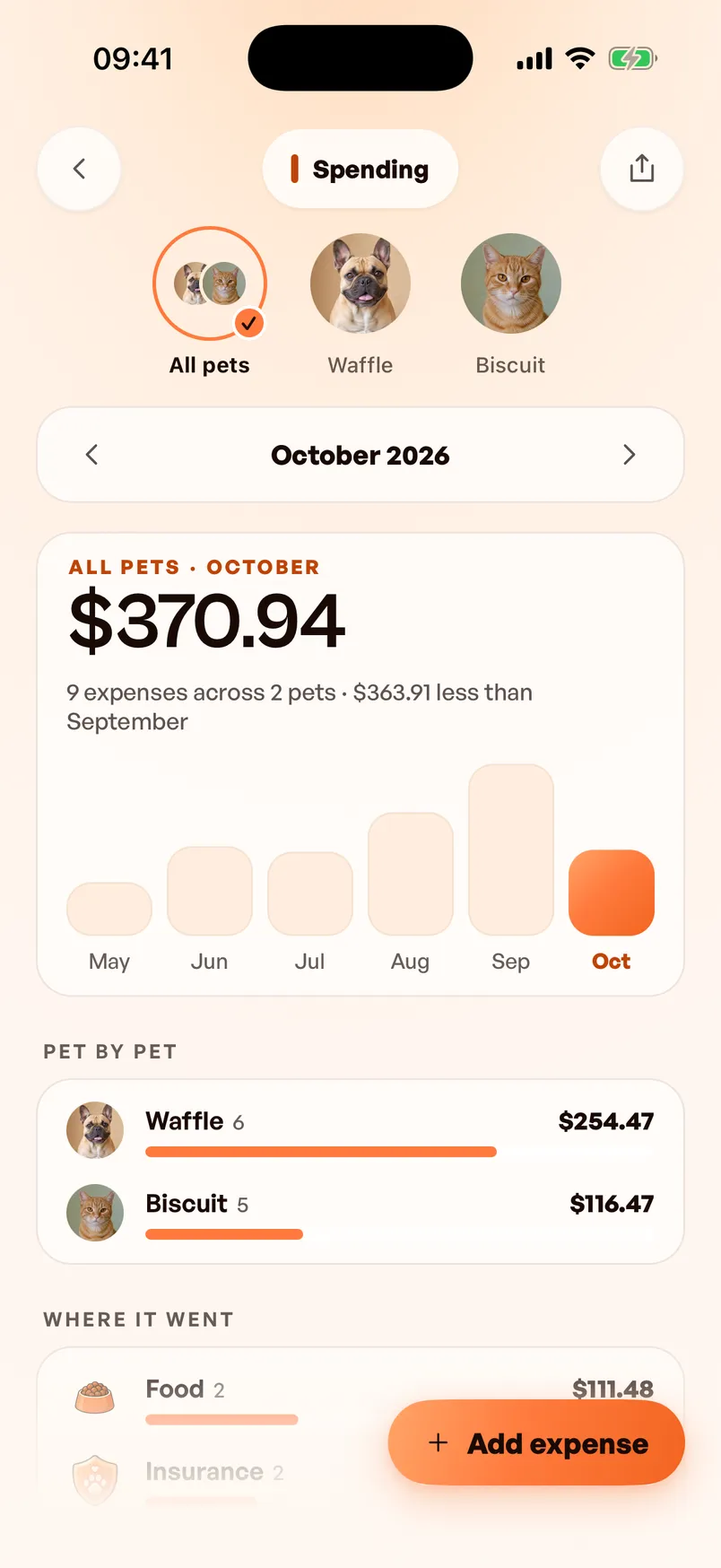
For one pet or all of them, Spending shows the month's total, the number of expenses and the change from the month before. It also charts the last six months and breaks the month down by pet, category and who paid, with every expense listed by day underneath. The Spending card on Home shows the month so far, and each monthly report ends with a Spending card.
Your phone reads the receipt
Tap Scan receipt and Dana reads the total, the date and the shop, then fills in the form for you to check. The reading happens on the phone, and nothing leaves it until you save. The photo stays with the expense. On phones with on-device dictation you can say the expense instead, or type a line such as "$22 treats for Bruno". Free accounts get a few receipt scans and voice entries, and typing a line is free on every plan.
Log one from a Dana AI chat
Write "Log $120 for Rex's vaccines today. Sara paid." in a Dana AI chat and you get a draft expense back. If it found an amount and a category, one tap saves it. Your phone creates the draft, not the AI model, so it uses none of your Dana AI allowance.
Totals across currencies
Each expense keeps the currency it was paid in. Totals use your own currency, with each expense converted at the reference exchange rate for the day it was spent, and a tap on a total shows what was paid in each currency. If Dana has no rate for a currency yet, the screen names it and leaves it out of the total rather than guessing.
Beside the care record
Recent expenses also appear on the pet's timeline alongside the care logged that day, and each one opens to its details. An expense never counts toward the Care Streak. Vaccine dates, medications and weights stay in the pet's health record.
Export a year for claims and taxes
With Dana Pro, export one pet's spending or the whole household's as a spreadsheet file (CSV) for this year, last year or the last twelve months, one row per expense. You usually submit the itemized invoice with a claim, so each receipt photo has its own Share button, and the pet insurance claim checklist covers what else to send.
Questions about pet expenses
- Is the expense tracker free?
- Yes. Recording expenses by hand, splitting them between pets, and reading totals and history are free on every plan, for every pet and every person in the household. Free accounts also get a few receipt scans and voice entries. Dana Pro removes that limit and adds the spreadsheet export.
- Does Dana connect to my bank or card?
- No. Dana records what you or someone in your household enters: by hand, from a receipt photo, or from a typed or spoken line. It never reads a bank account or a card.
- Can a pet sitter see what I spend?
- A sitter with limited access sees only the expenses they added themselves. A caregiver sees the household's spending by default, and the owner can turn that off for any caregiver, who then sees only their own.
- How do I use it for a pet insurance claim?
- Record each vet bill against the pet with its receipt photo. When you file, share the photo from the expense, and with Dana Pro export the year to see what you have spent on vet care. The claim itself still goes through your insurer; the claim checklist covers the paperwork.
- Can I track a dog and a cat together?
- Yes. You can view spending for one pet or all of them, and a purchase for both, such as a flea treatment, can be split between them. Dana works for dogs and cats.